Architecture
tock is three programs and one SQLite file. This page says what each part does, how data moves between them, and what it costs to run.
The pieces
| Program | Runs | Does |
|---|---|---|
trackd |
always, as a launchd agent (macOS) or a systemd user service (Linux) | records the front app, window title, browser URL and idle time; runs focus sessions |
tock |
when you call it | the CLI, the terminal UI, and tock web for the dashboard |
tockbar |
at login, macOS only | the menu bar and the notch: today’s time, sessions, ⌥⌘F, the dashboard window |
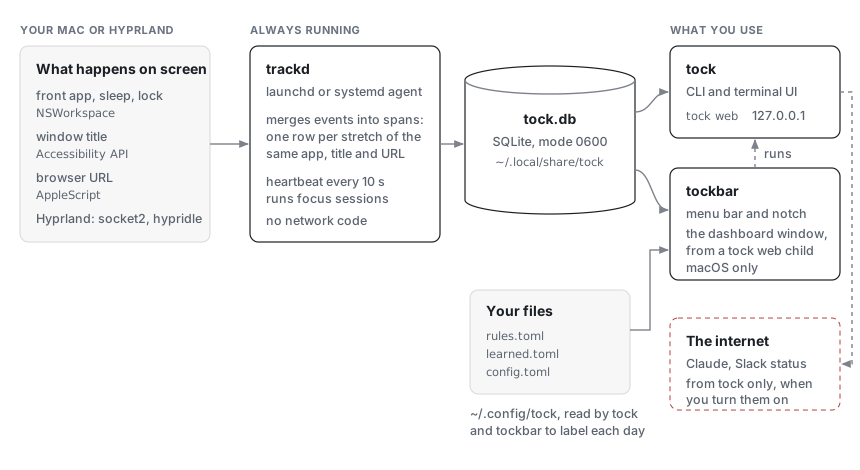
All three open the same database, ~/.local/share/tock/tock.db. They don’t
talk to each other over a socket. trackd writes a heartbeat to the database
every 10 seconds, and the others read it to tell whether trackd is running.
The dashboard window in tockbar shows a tock web that tockbar starts as a
child and stops when nobody has used it for a while, so tockbar itself links
no HTTP code.
Recording
On macOS, trackd listens for NSWorkspace app activation and reads the
focused window’s title through the Accessibility API. Browser URLs come from
AppleScript, for browsers that allow it. Idle time is the seconds since the
last input event; sleep, wake, lock and unlock come from NSWorkspace
notifications. This is the only cgo in the project (internal/collect).
On Hyprland, trackd reads the compositor’s event socket (.socket2.sock)
and gets idle and active from hypridle hooks.
A merger turns these events into spans: one row per stretch of the same app, title and URL, with a start and an end in Unix milliseconds. A span is extended in place while nothing changes, so a quiet hour is one row, not 360.
Labelling
Spans are stored without labels. Every time a day is read, the rules in
rules.toml, your own tags and the local model label it again. That’s why a
new rule applies to past days too.
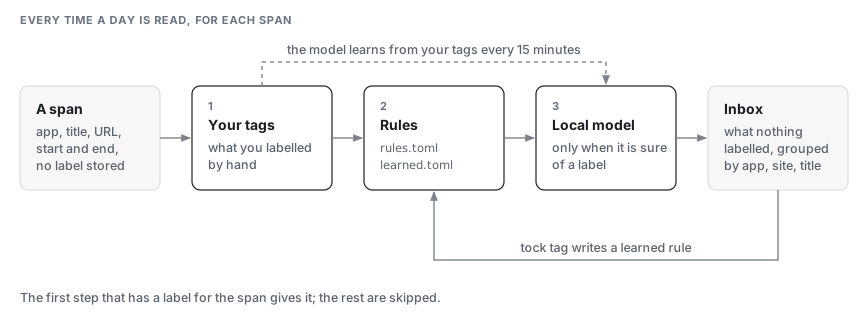
The order: your own tags first, then the rules, then the model when it is
sure. What is left goes to the inbox. Labelling an inbox entry writes a
learned rule (~/.config/tock/learned.toml), so the next match is labelled by a rule.
The model is a small classifier trained on this machine from your labels. It retrains every 15 minutes and when you tag something.
The menu bar and the notch
tockbar is one process with two halves. The Go half reads the database and decides what to show; the AppKit half draws it and has no clock and no database of its own. They pass JSON across cgo: the Go half sends the island, what the notch shows now with its pages and buttons, and the AppKit half sends back what you did.
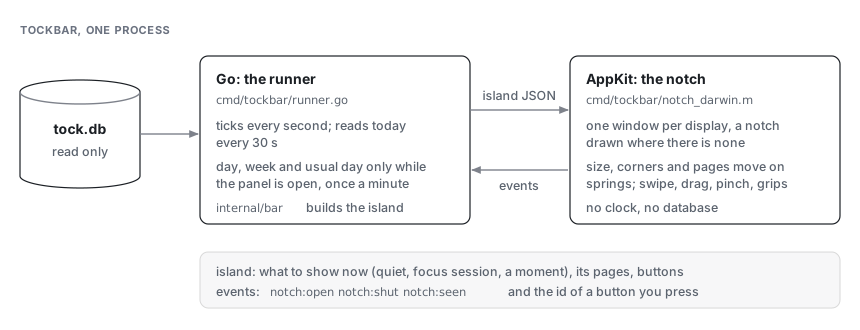
The pages in the open notch need the week and your usual day, which cost more to build than today alone. The runner reads them when the panel opens and once a minute while it stays open, and never while it is closed.
Code layout
- Pure packages:
internal/span,classify,stats,focus,reportandsuggestdo no I/O and never read the clock. Callers pass the time in. Most of the tests are here. internal/store: SQLite throughmodernc.org/sqlite(pure Go, no cgo). The schema changes only through numbered migrations ininternal/store/migrations.internal/app: what the CLI, TUI, web page and menu bar share: opening the store, loading rules and config, and building a day, a week or the inbox.internal/tui,internal/web: the terminal UI and the dashboard’s server. The dashboard itself is React with shadcn/ui and Recharts, inweb/.make webbuilds it intointernal/web/static, which is committed, so building tock needs Go only.internal/bar: what the menu bar and the notch show, as plain data, so it is tested without AppKit.cmd/tockbardraws it.
Installing
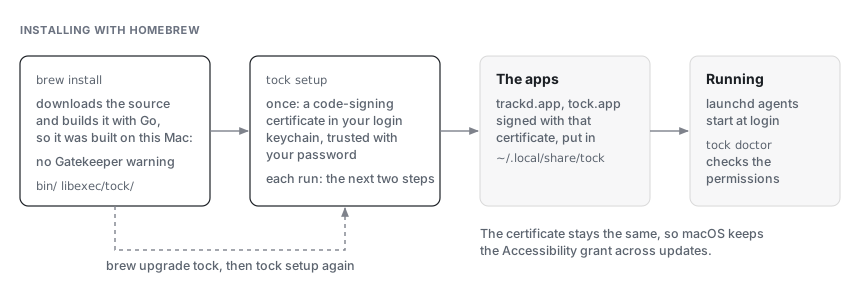
tock has no Apple Developer ID, so there is no notarized download. A build
made on your own Mac is not quarantined, so Gatekeeper doesn’t stop it.
macOS ties a permission like Accessibility to the app’s signature. Signing
every build with the same local certificate keeps that signature the same
from one version to the next, so updates keep the grant. make install
does the same from a clone, with make cert making the certificate.
The .dmg holds a small app, cmd/tockapp, with the same files inside it.
Opened from Applications, it runs the tock setup inside it, so a Mac
without Homebrew ends up with the same install. That one download is
quarantined, which is why its first open needs Open Anyway; what setup
installs from it is signed on the Mac and isn’t.
Network
trackd and tockbar have no network code. cmd/trackd/deps_test.go fails
the build if trackd ever imports net/http, crypto/tls or the Claude
client.
tock reaches the internet only for the features you turn on: Claude
suggestions and summaries (through the claude CLI or the API), and Slack
status. What they send goes through deny lists first, and --dry-run prints
it. The details are in Privacy in detail.
tock web listens on 127.0.0.1 only. Each run makes a new token, which the
page keeps in the URL fragment so it never reaches a server log. The page
loads nothing from the internet; its fonts are bundled.
Cost
Measured on an Apple Silicon Mac, November 2026:
| trackd memory | 36 MB footprint (budget 40 MB) |
| trackd CPU, idle | under 1 % |
| Building a day for the dashboard | about 200 ms, including four past weeks for the usual-day comparison |
| Database | about 9 MB after the first month |
Measure trackd’s memory with footprint $(pgrep trackd), not ps.
SQLite’s memory is allocated outside the Go heap, and ps misses part of it.
Testing
About 1,300 tests run with make test. The terminal UI has golden
snapshots in internal/tui/testdata. CI runs the tests without cgo on
Linux and with cgo on macOS.