tock
tock records what you work on, on a Mac or on Linux under Hyprland, and labels it with rules you write. You never start a timer. Your data stays on your machine, in one SQLite file.


What it does
- Records without a timer.
trackdnotes the app and window in front, the browser URL, and when you are away. It uses under 1 % CPU and about 36 MB of memory, and it has no network code. - Labels with your rules.
rules.tomlmaps apps, titles and sites to categories and projects. Change a rule and past days follow. - Asks once. Time no rule covers goes to an inbox. Labelling it there writes a rule, so the same thing is never asked again. A model trained on your own labels, on your machine, suggests the rest.
- Shows the day plainly. A terminal UI, a dashboard on 127.0.0.1, and a menu bar app. Every number is compared with your usual same weekday.
- Focus sessions.
tock session start 50or⌥⌘Ffrom any app. tock calls you back when you drift.
Install
On macOS, with Homebrew:
brew tap confuserdotcom/tock
brew trust confuserdotcom/tock
brew install tock
tock setup
Homebrew builds tock on your Mac, so there is no “unidentified developer”
warning. tock setup makes a local code-signing certificate, installs
trackd and the menu bar app, and starts them.
Without Homebrew, download the .dmg from
Releases. It isn’t
notarized, so the first time you open it, allow it under System Settings,
Privacy & Security, Open Anyway. To build from source, see the
README.
On Linux under Hyprland, run make install-linux, or download a tarball
from Releases. Coming from
ActivityWatch? tock import activitywatch export.json brings your history.
How it fits together
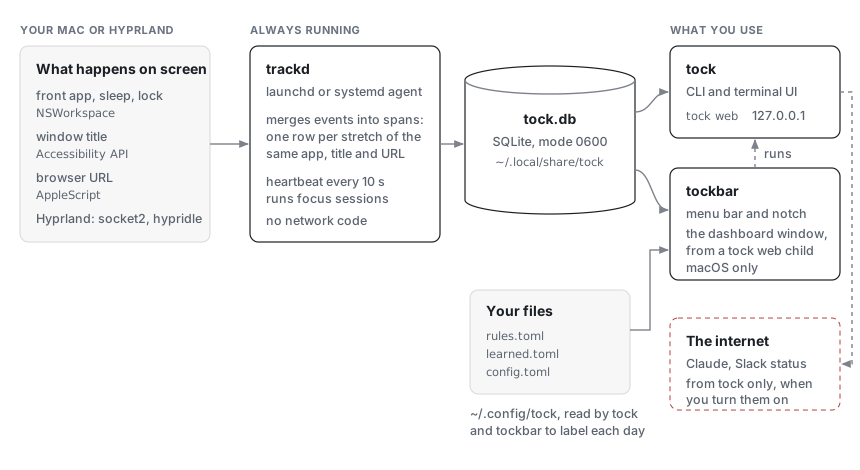
More in Architecture.
Privacy
- Activity is stored in
~/.local/share/tock/tock.db(mode 0600) and leaves the machine only if you export it. - A test fails the build if
trackdever links an HTTP or TLS client. - Private windows, and apps and sites you hide, are recorded without title or URL.
- Claude suggestions, summaries and Slack status are the only network
features. All are off by default, and
--dry-runprints exactly what would be sent.
The whole list is in Privacy in detail.
Read next
- Guide: every command, file and setting.
- Architecture: how the pieces fit, and what they cost.
- Design: colours, type and the rules every screen follows.
- Changelog.